RadioPro Talk
RadioPro Talk frequently asked questions.
11 FAQs
Does the Talk App support DHCP?
Does the Talk App support DNS?
- A static IP address.
- Port forwarded from an Internet exposed IP Address.
- The exposed IP address must also be static.
- A registered Domain Name.
How are the user accounts for logging on to the RadioPro Mobile app administered (i.e. created, deleted, password reset)?
How many people can connect to the mobile app?
How many people can talk on the mobile app?
How many user names and passwords can be set up in the ICU?
If someone connects, does it stay connected until they disconnect or does it time out?
Why does the connection drop and not reconnect when switching from Wi-Fi to cellular?
- The cellular network that your phone is switching to may not have enough bandwidth. RadioPro Talk™ App V.1.8 added an option to enable data compression.
- The IP Address of the RadioPro™ IP Gateway may not be reachable from your cellular network. Configure Port Forwarding. See the RadioPro IP Gateway Installation Guide page 19 "Configure Port Forwarding".
Why does the connection drop and not reconnect when switching from cellular data to Wi-Fi?
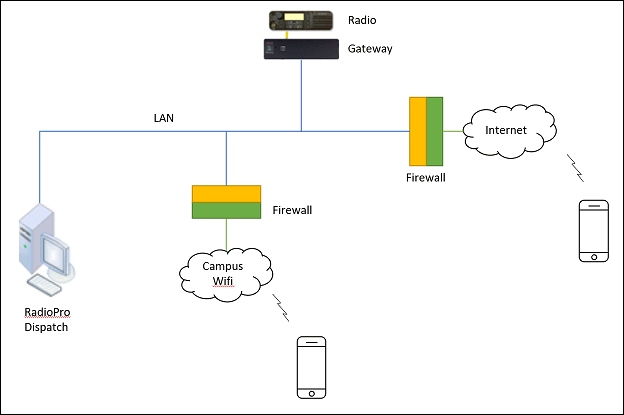
A RadioPro™ Talk app connecting through the Internet(cellular), may pass through a different set of firewall rules than a RadioPro™ Talk app connecting through a Wifi connection.
- It may be necssary to have 2 connections set up in the RadioPro™ Talk app. One for the Wi-Fi connection that looks like 10.xx.xx.xx or 192.xx.xx.xx and the other that has the static IP address exposed to the internet.
- The Network infrastructure that hosts the RadioPro™ IP Gateway may need a modification to allow access through the Wifi Firewall. The documentation for Port Forwarding may be helpful in this case as well. Please See the RadioPro IP Gateway Installation Guide page 19 "Configure Port Forwarding".
Why doesn't the RadioPro Talk app show Zones?
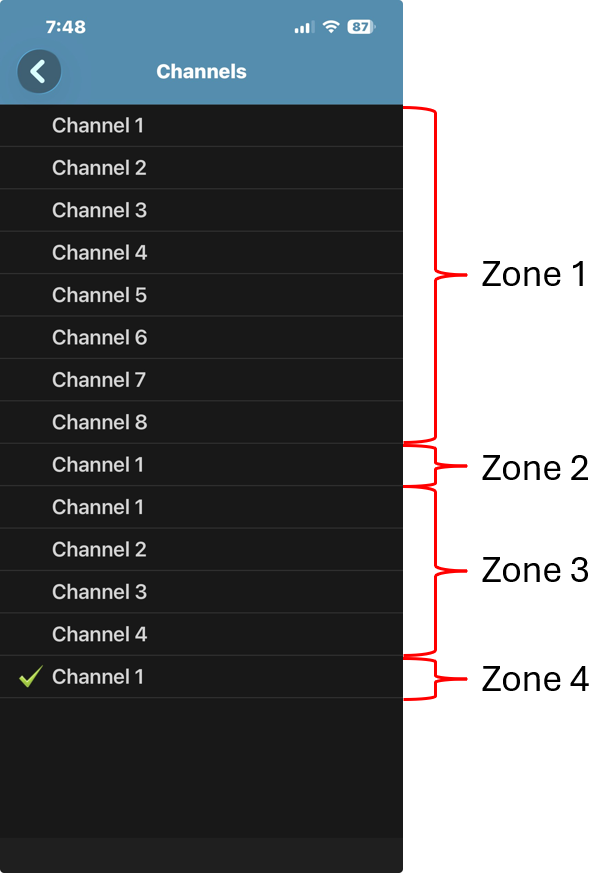
For Motorola MOTOTRBO systems, the RadioPro Talk app does not display zone names.
Instead, RadioPro Talk presents a single list of all available channels. Users can still select (channel steer) to any channel that is marked as visible in the system configuration.
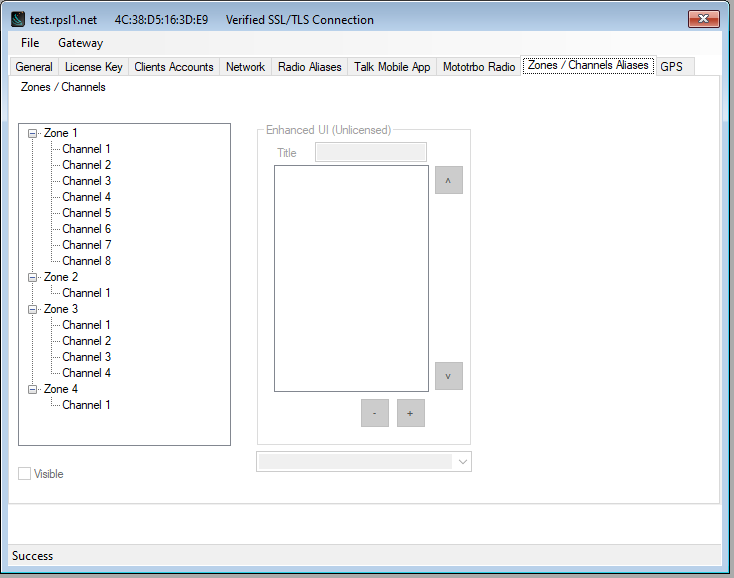
Channel visibility is controlled in the IP Gateway Configuration Utility (ICU).
ICU Configuration Example
RadioPro Talk View
Why Zones Aren’t Shown
RadioPro Talk is designed to be simple and easy to use, especially for mobile users.
Showing zones would add extra steps and complexity, so the app combines everything into a single channel list.
How to Identify Zones (If Needed)
If you need to distinguish channels by zone, you can:
- Edit Channel Aliases in the ICU
- Include the zone name in the channel name
- Example: Zone 1 - Dispatch, Zone 2 - Tac 1
More Advanced Zone Control
Zone-based organization is fully available in:
- RadioPro Dispatch
- RadioPro Solo
These applications provide more detailed control and are better suited for desktop or advanced users.
Additional Information
See: RadioPro IP Gateway Installation Guide for Motorola MOTOTRBO for additional information:
Will the mobile Talk app allow incoming phone calls while the app is running?
- iOS devices: You will not be able to hear incoming transmissions while on a phone call.
- Android devices: Incoming transmissions will interrupt your phone call. Version 1.11 adds a switch to block radio traffic during a phone call.