RadioPro IP Gateway
RadioPro IP Gateway frequently asked questions.
10 FAQs
Can I transfer licenses to another Gateway?
Does the RadioPro IP Gateway Support Gigabit Ethernet?
Yes.
The system uses a Gigabit Ethernet interface (1000 Mbps) and an asynchronous TCP socket architecture capable of high-throughput communication.
Actual throughput depends on deployment conditions and workload. In typical implementations, throughput can range from hundreds of Mbps under light load to lower sustained rates under heavier processing conditions.
It is important to note that RadioPro™ applications require relatively low network bandwidth (approximately 2.2 kBytes/s with audio compression, or 22 kBytes/s without), so Gigabit Ethernet provides ample capacity for reliable operation with significant headroom.
How do I sync the time servers of my gateways?
Use a Central Time Server or public NTP source.
There are several ways to accomplish this depending on how isolated your local network may be. If the network has no public internet access, consider using a Central Time server such as ATS (Absolute Time Server). However, if your network has open access to the internet consider using a public NTP source such as 'pool.ntp.org'.
Please refer to the following for additional information:
How do I update the OS of a RadioPro IP Gateway?
The RadioPro IP Gateway version 8.1.X operates on Windows 10 Enterprise 2019 LTSC with automatic updates disabled. To carry out necessary security maintenance updates, please adhere to the following procedure:
- Download and run ICU (IP Gateway Configuration Utility) (version 8.1.16+)
- Connect to the RadioPro IP Gateway. Verify that it is version 8.1.X.
- Download the latest version of the RadioPro IP Gateway Firmware for Windows 10. (version 8.1.X) Install the firmware upgrade using instructions on page 15 of the RadioPro IP Gateway Installation Guide.
- Reconnect to the RadioPro IP Gateway and verify that the Gateway and DNS settings on the "Network" Tab will enable communication with Microsoft's upgrade servers.
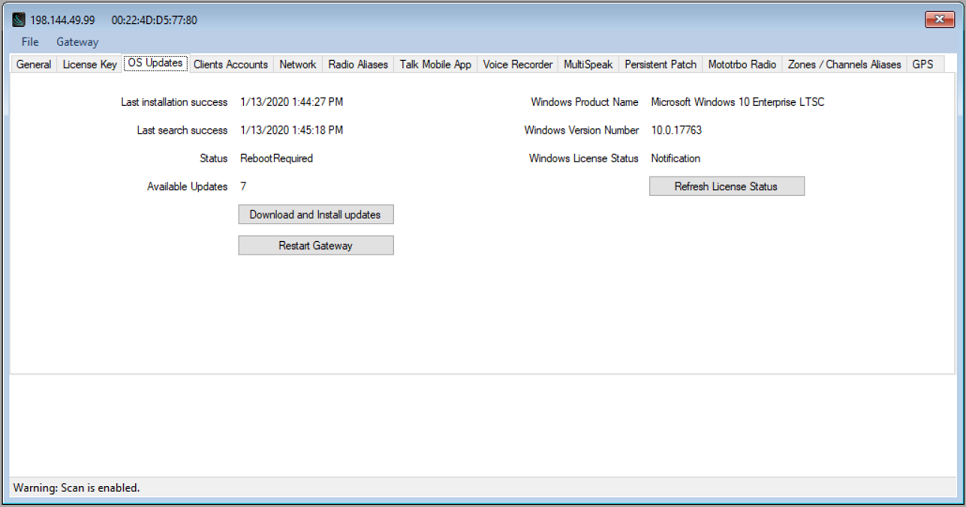
- Continue with these steps until the "OS Updates" Tab displays a “Status” of “NoUpdatesAvailable” and “Available Updates” shows 0: (Note: At the time of writing, this process required two iterations in less than 30 minutes)
- Re-establish your connection with the RadioPro IP Gateway.
- If the “Status” on the OS Updates Tab is “SearchingForUpdates”, “Downloading”, or “Installing”, wait for a few minutes before reconnecting to the Gateway to check the current status.
- If the “Status” on the OS Updates Tab is “UpdatesAvailable”, click on the “Download and Install updates” button.
- If the “Status” on the OS Updates Tab is “RebootRequired”, click on the “Restart Gateway” button.
- Repeat these steps as needed.
What is the Processor speed of the RadioPro IP Gateway?
What is the underlying OS for the RadioPro IP Gateway?
Linux, Windows 10, or Windows 7
| Date of Purchase | Operating System |
| 6/2010 - 1/2020 | Windows 7 embedded |
| 2/2020 - 3/2022 | Window 10 IoT Enterprise |
| 4/2022 - Present | Debian GNU/Linux |
What is the warranty period for the RadioPro IP Gateway?
Why am I getting an Invalid License Key error in the ICU program, when I try to import the old License Keys.
- The wrong license key may have been imported into the wrong Gateway.
- Please contact CTI Products Technical support
Why is my Gateway status showing disconnected in the Dispatch Client?
There are several reasons that an IP Gateway would be shown as "disconnected":
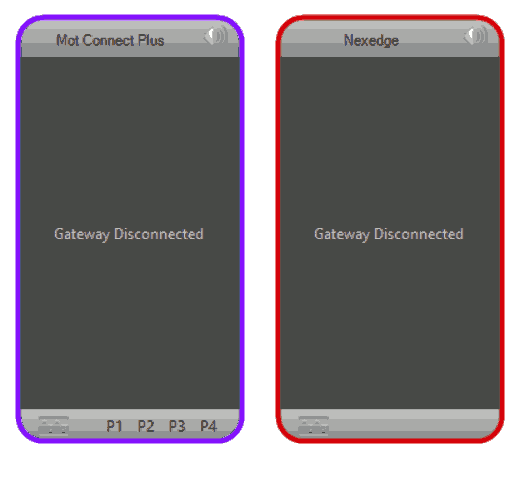
- Each client and RadioPro IP Gateway must have compatible versions in order to communicate. For more details on version compatibility, see the Installation Guide page 22 "System Compatibility Considerations".
- The ethernet cable connecting the IP Gateway to the LAN or WAN may be disconnected.
- The IP Gateway must be powered on and must have completed its boot-up procedure. The boot-up procedure could take up to two minutes.
- Ensure that the router or switch between the PC and the Gateway has power.
- The Dispatch Client and the IP Gateway may be on different subnets. Possible Solutions:
- Change the IP address and subnet masks of the Gateway and/or Dispatch so Dispatch can reach the IP Gateway
- Configure Port Forwarding:
- See the Installation Guide page 19 "Configure Port Forwarding"
- See https://portforward.com/router.htm for detailed instructions for the specific router in use at your site.
Why is the RadioPro IP Gateway status indicating connected, but the GPS and voice control station radio’s do not work or state radio disconnected?
- For Motorola radios, try a different USB port on the back of the gateway.
- Verify that the radio programming is configured correctly.
- For Motorola MOTOTRBO radios, see the "Installation Addendum for Motorola MOTOTRBO"
- For Motorola APX 4500 radios, see the "Installation Guide Addendum for Motorola APX 4500"
- For Kenwood NX-7xx/8xx radios, see the "Kenwood NEXEDGE NX-7xx/8xx Addendum"
- For Kenwood NX-57xx/58xx radios, see the "Kenwood NEXEDGE NX-57xx/58xx Addendum"
- Contact CTI Products Technical support