RadioPro Dispatch Frequently Asked Questions
Radio dispatch, school bus GPS, warehouse and yard communications, equipment alarms, recording, and support.
Bring multiple radio channels into one Windows console
RadioPro Dispatch brings compatible radio/Gateway voice paths together on one Windows PC. Dispatchers can monitor and select channels, speak with field teams, and use supported GPS, messaging and recording features.
Independent simultaneous radio channels need their own control-station/Gateway paths. The radio interface, configuration and licenses determine which functions are available.
Search RadioPro Dispatch FAQs
Yes, on radio systems and interfaces that support private calling. A dispatcher can select an individual subscriber and initiate a private call instead of transmitting a group call to everyone on…
Yes, when the radio system supports Radio Check through the selected control-station interface. Dispatch can request a response from an individual radio before the operator attempts a voice call.
Yes. RadioPro Dispatch provides Call Selected and All Call workflows for announcements to configured channels. The system needs an independent control-station/Gateway voice path for each channel…
Yes. A RadioPro Dispatch Subscriber Grid can display a configured group of radio contacts with activity, availability and missed-call indications in one view. It is useful when an operator needs a…
Yes. RadioPro Dispatch can combine radio voice communications with a map of school bus locations when the bus radios, radio system, Gateway, and licenses support GPS reporting.
Yes. RadioPro Dispatch can display supported equipment inputs through its telemetry features when the appropriate I/O hardware, network connection, configuration, and licenses are provided.
Yes. RadioPro Dispatch supports image overlays on its GPS map, which can add campus, yard or facility context to the displayed area. An overlay is a map illustration; the radio locations still…
Yes. RadioPro Dispatch can send text messages to supported two-way radio subscribers using the computer keyboard. Available destinations and message functions depend on the digital radio system…
Yes. RadioPro Dispatch supports selected footswitches, desk microphones, handsets, and headset adapters with physical push-to-talk controls.
Yes. RadioPro Dispatch provides supported stopped-vehicle reporting using received GPS information, with the required radio configuration and licenses. The result describes observed radio-location…
Yes. RadioPro patching can bridge voice audio between supported Motorola MOTOTRBO and Kenwood NEXEDGE radio systems. Each side needs its own compatible control station radio, correctly configured…
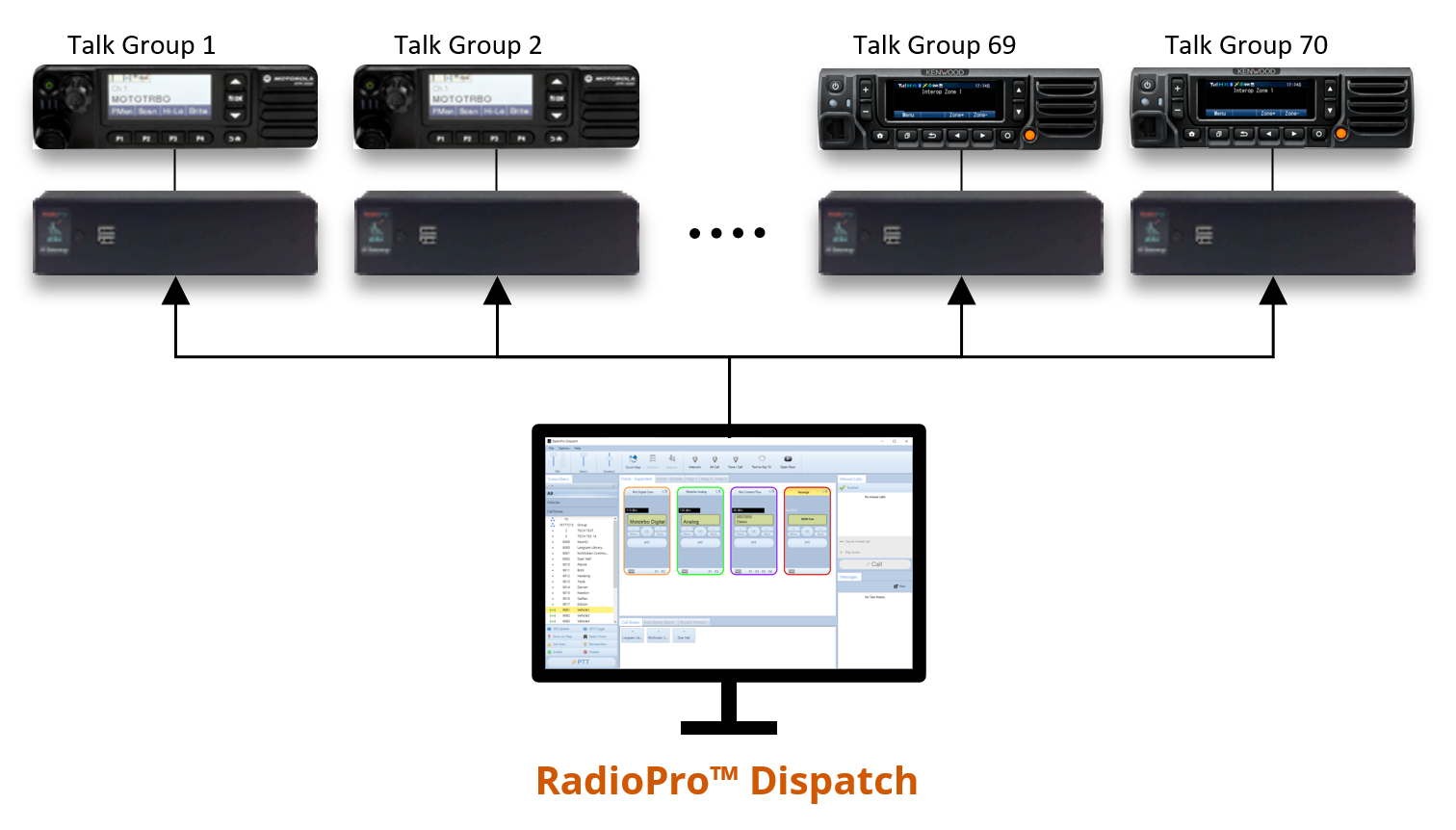
Yes. RadioPro Dispatch is designed to connect to multiple RadioPro IP Gateways and present their radio channels or talkgroups in one Windows console.
Yes. RadioPro Dispatch provides radio audio recording and playback when history logging is enabled and Dispatch is running and connected to the appropriate Gateway.
Yes. With a supported radio system, GPS-capable subscribers, correct programming, and the required licenses, RadioPro Dispatch can display radio locations and review location history.
Yes. RadioPro Dispatch has a Missed Calls panel that can help the operator track incoming calls needing a response. The User Guide's basic workflow is an incoming private call that remains on the…
Yes. RadioPro Dispatch supports geofences that identify when a tracked radio enters or leaves a defined area. The feature depends on a supported GPS configuration and the required licenses.
Yes. RadioPro Dispatch includes prerecorded, or pre-canned, audio-message capability for sending a prepared announcement over a configured radio path. A repeatable yard instruction or shift-change…
RadioPro Dispatch can send remote disable and enable commands to a radio on supported digital systems. The function depends on the subscriber radio, control station, system mode and programming;…
Yes. RadioPro Dispatch can be configured to send a single or dual alert tone before a voice call using a custom Audio Call action. Tone settings belong to that action, so the operator can use a…
Yes, the Dispatch Console follows the PC's time format. So, if your PC uses the 24-hour time clock, the Dispatch console will display 24-hour time. Once you change the…
Ordinary radio GPS tracking does not provide dependable indoor or room-level positioning simply because the radio can communicate inside a building. GPS reception and radio communications use…
Use RadioPro Dispatch to bring the required warehouse and yard radio paths into one Windows console, with clear labels and audio settings for each team.
There are two ways to locate the license key ID: Navigate on the old PC to the following path C:\Program Files (x86)\CTI Products\RadioPro Dispatch and search for the…
Use Archive Viewer to search the required events, then choose File → Export Archive Records. The export can include a CSV event list and the associated audio.
Contact CTI Products Technical support. Get in Touch
Use PC Cross Mute for adjacent Dispatch positions that should mute each other's local audio. Enable the feature on the intended positions and assign them the same Cross Mute ID.
On the dispatch machine you want to clone, in RadioPro Dispatch, navigate to File -> Edit to put your Dispatch software in "Edit" mode. Navigate to File -> Clone…
RadioPro Dispatch recording retention depends on available storage, traffic volume, and your history-management practices. There is no single storage estimate that fits every radio system.
Windows 10/11 Pro, Core i5 CPU with 8GB Memory and 500 GB Storage. Detailed Specifications: Category Minimum Requirements Operating System Windows 10 Pro or 11 Pro, 64 bit…
On a supported and correctly programmed radio system, a received emergency event produces audible and visible indications in RadioPro Dispatch so the operator can identify and respond to the radio…
RadioPro Dispatch (v8,9) will typically operate with any PC microphone that is supported by Windows 10/11 for Audio.
Reasons for Failed Calls In RadioPro versions 8.3.1+, 9.3.1+ this is how to determine the reason for failed calls: In RadioPro Dispatch, choose “ Help ”->” Logs ”. This…
Gateway Status: Duplicate License detected What Causes the Error The cause of this error is that another RadioPro Dispatch PC is already connecting to this RadioPro IP…
Verify that the radio programming is configured correctly by viewing the RadioPro IP Gateway Installation and Configuration Guide: Motorola MOTOTRBO Installation Guide…
Missing first words can result from speaking before the radio is ready, RF conditions, delayed audio startup, or a problem in a shared radio/network path. First establish whether it happens on…
If the radio keys up but no voice is heard, check the microphone audio path separately from the PTT control path. A working PTT button confirms control, but not that microphone audio is reaching…
Check the association among the radio ID, the displayed alias and the location report before treating a surprising map position as the radio's current location. An alias problem, duplicate…
First determine whether Windows detects the headset, whether Dispatch has the correct audio device selected, or whether only the physical PTT button is not working. These are separate checks.
RadioPro Dispatch routes audio using the selected Audio Preset. Check that preset and its device assignments when audio comes from an unexpected speaker, headset, or earpiece.