RadioPro Solo Frequently Asked Questions
Solo for Windows: setup, virtual radio controls, replay, intercom, shared channels, audio and client licensing.
A radio control station on your Windows PC
Solo provides access to one compatible Gateway/control-station path at a time. Start with connection setup, then explore the virtual panel, replay and same-Gateway intercom. Multiple users on one Gateway share the donor radio's selected channel.
Set up your first connection · Compare Solo, Dispatch and Talk
Search RadioPro Solo FAQs
Yes, on radio systems and interfaces that support private calling. A dispatcher can select an individual subscriber and initiate a private call instead of transmitting a group call to everyone on…
Yes. RadioPro can provide PC-based dispatch access to a compatible analog two-way radio system through a control station radio and a RadioPro IP Gateway. The correct interface depends on the radio…
Yes. RadioPro can provide radio access from a remote office, a home workstation, or a mobile device when a suitable network connection to the RadioPro IP Gateway is available.
RadioPro Solo can provide a PC-based alternative to a desktop tone remote when the radio system and control station are compatible with RadioPro. This is a change in the access arrangement, not a…
Yes. Solo provides instant replay and history browsing for available recordings from the connected Gateway. This is useful when an office user needs to hear an instruction again without asking the…
No . Client licenses cannot be shared or transferred between Gateways. They can be added, but not removed.
Yes. CTI provides RadioPro demonstration software and a demonstration radio system so you can evaluate the applications before purchasing equipment.
Yes. Office users can access a compatible factory radio system from Windows PCs through a RadioPro IP Gateway and control station radio, rather than installing a separate transmitting radio and…
Yes. RadioPro can provide remote talk/listen access to a Motorola APX 4500 using its accessory-connector audio and COR/PTT signals. CTI describes this as an intercom-style interface. It is a basic…
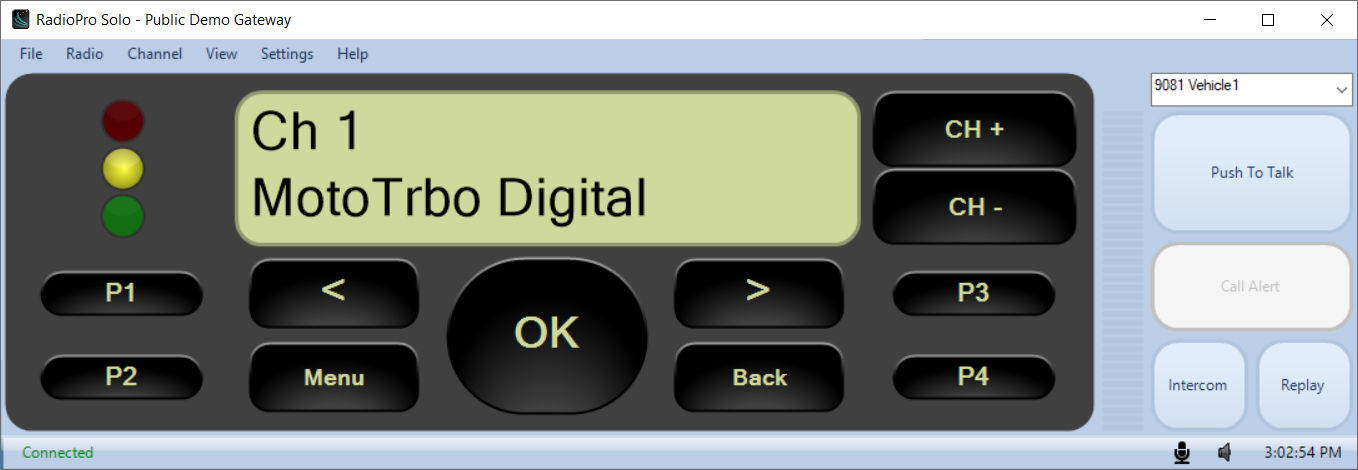
Yes. With a supported Motorola MOTOTRBO or Kenwood NEXEDGE control-station interface, Solo provides a virtual radio front panel and supported remote radio functions. The available controls depend…
Yes. RadioPro Solo's Intercom button allows Solo clients connected to the same Gateway to communicate without transmitting over the radio channel. The conversation uses the IP connection between…
Yes. Solo can run alongside other Windows applications, and its client settings provide several ways to keep radio access convenient. For example, a shipping clerk can work in another business…
Additional Solo/Talk connection capacity can be purchased for an existing RadioPro IP Gateway. The upgraded license is issued for that particular Gateway; adding connections is different from…
Install a supported RadioPro Solo client on the Windows PC, enter the Gateway connection address supplied for your site, and sign in with an account configured on that Gateway. The radio and…
Bandwidth depends on audio mode, the number of active voice streams, connected clients and the network path. CTI's published planning figures are approximately 2.2 kBytes/s per compressed audio…
Encrypted network connections are available with supported RadioPro versions and the appropriate connection configuration. Encryption should be verified for your installation rather than assumed…
A basic RadioPro system needs a compatible control station radio, a RadioPro IP Gateway, the correct radio interface cable, an IP network, and licensed client access.
Choose Dispatch for a full Windows dispatch console, Solo for simple Windows radio access, and Talk for access from an iPhone, iPad, or Android device. All three connect through RadioPro IP…
TurboVUi is the former name of CTI Products' RadioPro product family. Older Gateway labels, installers and manuals may still use TurboVUi, while current products use the RadioPro name.
RadioPro supports selected Kenwood NEXEDGE mobile radios used as control stations, including the model families below. The radio's supported system mode, firmware, programming and Gateway…
Choose a Motorola MOTOTRBO control station by the required RadioPro functions, radio-system type and Gateway generation. CTI's documentation includes XPR 2500, XPR 5550 and XPR 5550e control…
Match RadioPro software to the Gateway family and check the release requirements before updating. Patch revisions do not always need to be identical, but an arbitrary mix of versions is not supported.
Clients connected to one RadioPro Gateway share its single voice control-station radio. When a supported client changes that donor radio's channel, every client on that Gateway follows the radio's…
A repeatable disconnect after approximately five minutes can indicate a Gateway licensing limit or an expired timed license. Check for a license message before treating the symptom as an ordinary…